Website Image Downloader
Python Scripts
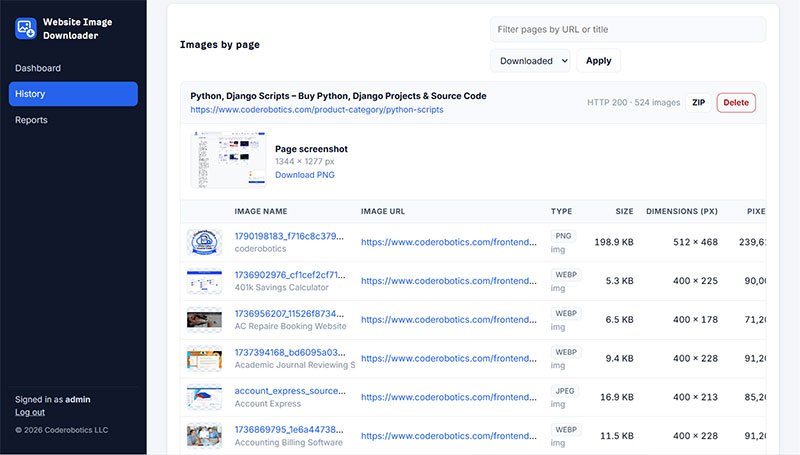
Website Image Downloader is a self-hosted Django (Python) web application that downloads high-quality images from a single web page or an entire website. It crawls pages on the same domain breadth-first, up to 500 pages. It picks the largest image from srcset and tags and also finds lazy-loaded images, CSS background images, og:image and twitter:image meta images, icons and video posters. Each crawled page gets a table listing every image's name, URL, type, file size, pixel dimensions and status. The tool can also capture full-page screenshots with headless Chrome, skip images below a minimum size, and download each image only once when it appears on several pages. It suits web developers, SEO and marketing agencies, e-commerce teams and content managers who need to collect, audit or back up website images. The complete source code is sold for a one-time payment, with one year of free updates and email support.
Website Image Downloader
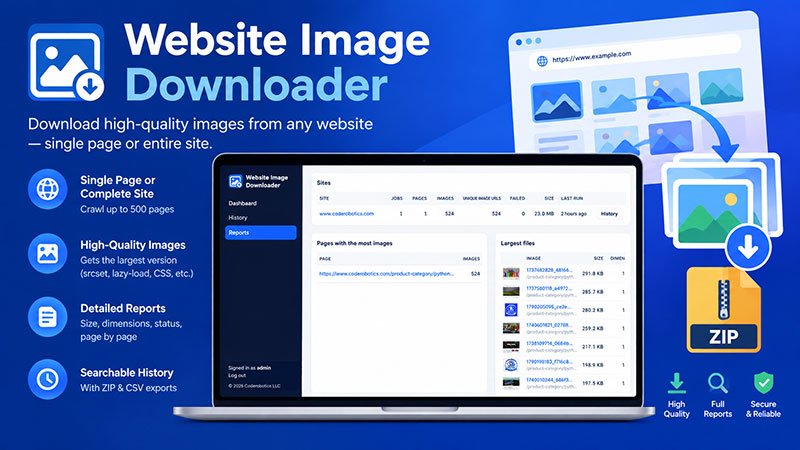
Saving images from a website one by one is slow. You often get small thumbnails instead of the full-size files, and it's hard to keep track of what came from which page. Website Image Downloader fixes this. It crawls a single page or a whole site, finds the highest-quality version of every image, downloads it once, and lists every image page by page with its size, dimensions and status. Every download is saved to a searchable history with reports and one-click ZIP and CSV exports.
What You Get
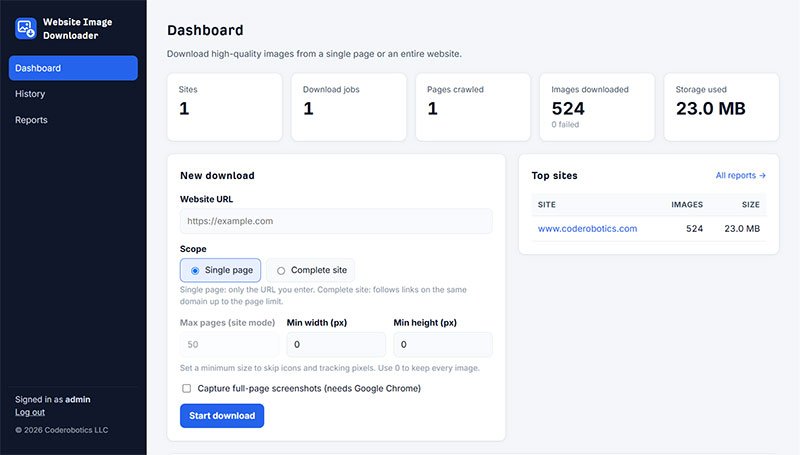
- Single-Page or Complete-Site Crawling: Download images from one URL, or follow links on the same domain, breadth-first, up to 500 pages.
- High-Quality Image Extraction: Picks the largest candidate from srcset and tags.
- Deep Image Discovery: Finds lazy-loaded images (data-src), og:image and twitter:image, icons, CSS background images, video posters and direct links to image files.
- Page-by-Page Image Tables: Lists each image's name, URL, type, file size, width × height, total pixels and status, 25 rows at a time with Prev/Next buttons for each page.
- Status Filters: Shows only downloaded, failed or skipped images.
- Full-Page Screenshots (Optional): Captures PNG screenshots with headless Chrome and shows each screenshot's size in pixels.
- Minimum Size Filter: Skips icons and tracking pixels below a width or height you choose.
- Duplicate Handling: Downloads an image once, even when it appears on several pages, and marks it "Repeat" on the later pages.
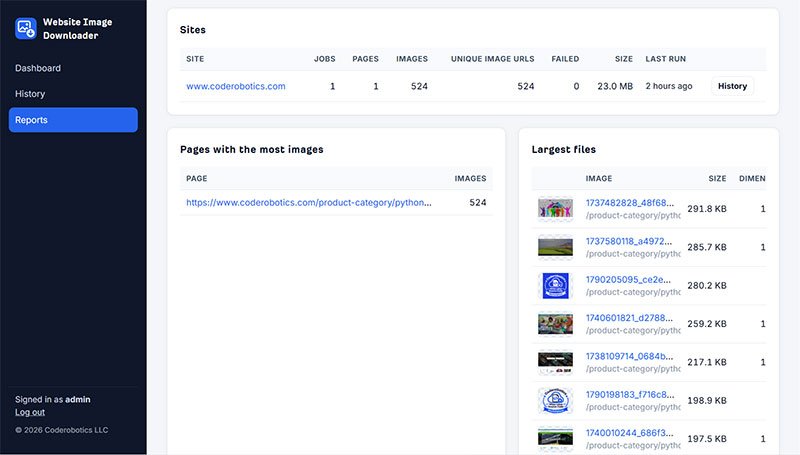
- Admin Dashboard: Shows totals for sites, jobs, pages crawled, images downloaded and storage used, along with the new-download form, jobs in progress, top sites and recent downloads.
- Live Job Progress: The job page updates automatically during a crawl. You can cancel a running job or run a finished one again with the same settings.
- Searchable History: Search by site, job URL or page URL, filter by site, status or scope, and switch between "By site / job" and "By page" views.
- Flexible Deletion: Deletes one record, selected records, every record for a site, or a single page. The downloaded files are removed too.
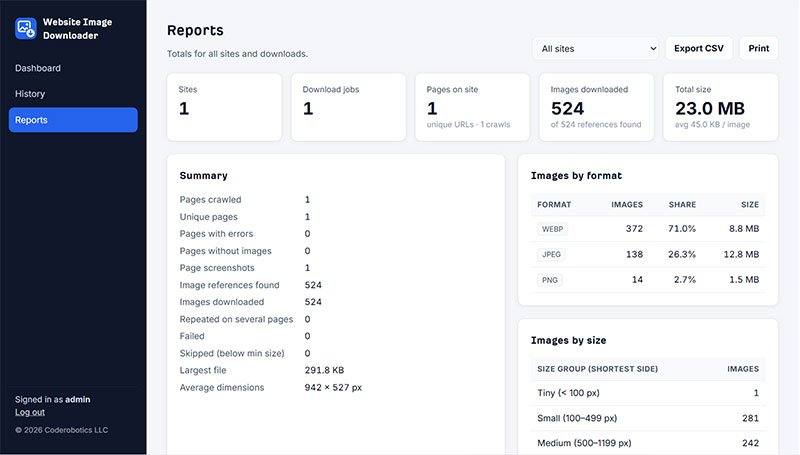
- Detailed Reports: Available for all sites or for one site. They cover:
- unique and crawled pages
- images found, downloaded, failed, skipped and repeated
- total and average size
- breakdowns by format and by size
- pages with the most images, the largest files and the highest-resolution images
- Export Options:
- a ZIP of a whole job or a single page, with the images, screenshots and an images.csv
- a CSV listing every image in a job
- CSV and print versions of the reports
- Secure Admin-Only Access: Only staff users can sign in. There's no Django admin site; everything is managed from the tool's own pages.
- Light and Dark Mode: Clean, branded interface with a custom logo, favicon and web fonts.
Why This Tool?
Browser extensions and "save page" options often miss lazy-loaded images, grab low-resolution thumbnails and give you no record of what you downloaded. This tool is built for complete, organized, repeatable image collection:
- Gets the highest-resolution version of each image, not the thumbnail.
- Finds images that most downloaders miss, such as CSS backgrounds, lazy-loaded images, social meta images and video posters.
- Downloads each image only once across the whole site.
- Keeps a full history and reports, so every crawl can be tracked and audited.
- Runs on your own server, so your data stays with you.
- Comes with automated tests that run real crawls against a local test website.
Perfect For
- Web designers and developers moving or redesigning client websites
- Digital marketing and SEO agencies auditing image assets
- E-commerce teams collecting product images
- Content managers backing up website media
- QA teams checking image sizes, formats and broken images across a site
- Researchers and archivists saving web content
- Agencies that need a private, self-hosted image scraping tool
Tech Stack
- Python 3.10+
- Django 5.2
- Requests
- BeautifulSoup
- Pillow
- Selenium (headless Chrome for screenshots)
- SQLite
- HTML5, CSS3 (light/dark mode)
Prerequisites
- Python 3.10 or newer (tested on 3.14)
- pip, to install the packages in requirements.txt
- Google Chrome, only if you want page screenshots (Selenium downloads the matching driver automatically)
- For production: a WSGI web server that serves staticfiles/ and media/
Don’t Keep This to Yourself — Share It!


License
A regular license permits the use of an item in a single project, whether for personal or commercial purposes, by you or on behalf of a client. Resale of the item, either individually or as part of a project, is prohibited, and the distribution of source files is not allowed.
Server Requirements
- Python 3.10+
- Django 5.2
- Requests
- BeautifulSoup
- Pillow
- Selenium (headless Chrome for screenshots)
- SQLite
- HTML5, CSS3 (light/dark mode)
Payment Type
One time Payment: Upon receiving your full payment, we will provide you with the complete source code. After that, no additional payments will be required.
Delivery Time
We will send the Download Link to you Within 2-4 hrs. On Working Days(Monday- Friday) And the source code will deliver within 4-8 hours On Weekends (Saturday -Sunday).
Technical Support
Unlimited Email Support for One Year.
Script Update
Free Updates for One Year.
Customization Scope
Includes Complete Source Code.
Encryption
No Encryption and No Domain Limitations.
Installation
No Free Installation Services. Our charges range from $5 to $10, depending on the software's complexity and criticality.


No comments yet. Be the first to comment!